
Application Note - MACsec
1. Introduction
MACsec is a Layer 2 security protocol based on the IEEE 802.1AE standard, providing data encryption, integrity verification, and replay protection functions to ensure the security of data transmission on Ethernet links.
2. Configuration steps
Network Topology
- Device Connection: Two devices connect directly through their Ethernet interfaces (e.g.,
eth3on ST2_1 toeth3on ST2_2). - Communication mode: Encrypted Communication Based on MACsec Protocol

MACsec Configuration Steps
Create MACsec Interface
- Enter the configuration interface
- Go to the 'Network>Interfaces' page
- Click to add a new MACsec interface
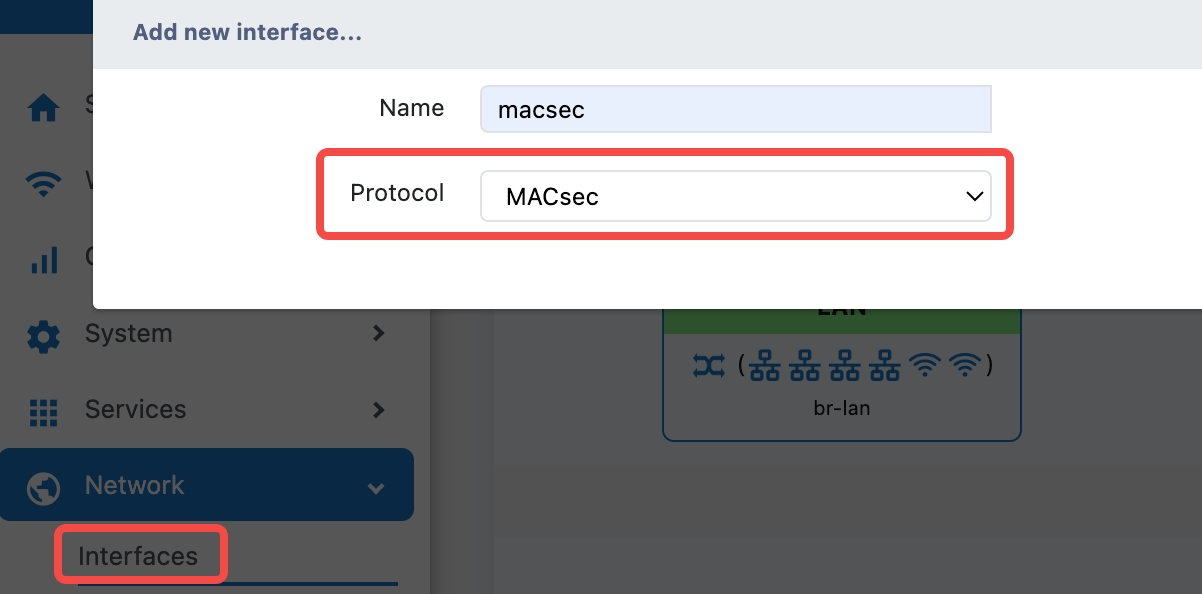

Basic Settings Configuration
Protocol and interface configuration
- Protocol:
MACsec - Bring up on boot:
✓(Default startup) - Device:
eth3(Select physical interface)
Transmission mode configuration
- MACsec transmit mode:
Encrypt and Authenticate - Function Description: Provides complete encryption and authentication protection
- Security Level: Highest security level, recommended for use
Security Parameter Configuration
Encryption suite settings
Cipher suite: GCM-AES-128
- Algorithm Description: Using GCM mode of AES-128 algorithm
- Security Strength: Provides strong encryption protection
Also supports several other encryption protections
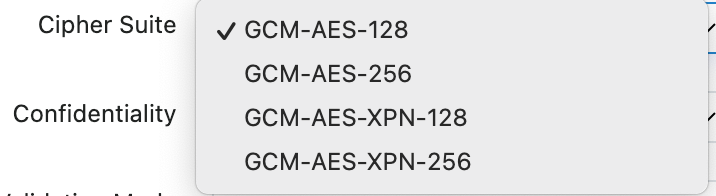
Confidentiality and verification configuration
Confidentiality: offset 0
Frame Validation Mode: Strict - validation, drop illegal frames
- Confidentiality: Data confidentiality offset
- Frame Validation: Strict validation mode, discarding illegal frames
Advanced Security Configuration
Security Channel Identifier
Include SCI: ✓ Enable
- Function: Enable SCI tagging in the SecTAG field of the MACsec header
- Function: Provide secure channel identification
Key Management Configuration
- SAK Rekey Interval: Set to 0 to disable automatic SAK key refresh
- Port: Port component of SCI, range 1-65535, default is 1
- Priority: Priority used when the key server selects a key
Replay Protection
Replay Protection: ✓ Enabled
- Function: Prevent replay attacks
- Recommendation: It should always be enabled in the production environment
MKA Key Configuration
Connection Associated Key Configuration
MKA CKN: [Connection Association Key Name]
MKA CAK: [Connection Association Key]
Configuration methods
- Manual Input : Enter the pre-shared key
- Automatic Generation : Click the "GENERATE CAK" button to generate a random key , click the * symbol to display the specific key plaintext and copy it to the "MAK CAK" input field of the MACsec peer device
Safety Requirements :
- CKN and CAK must be consistent between the two communicating parties
- The key should have sufficient complexity
- Regularly change keys to improve security
Network Configuration
IP Address Configuration
IP address/Netmask: 192.168.100.1/24 (example)
- Format: Use CIDR format
- Instructions: Leave blank if binding to a bridge
- Example: A.B.C.D is equivalent to A.B.C.D/24
3. Troubleshooting
Frequently Asked Questions and Solutions
Basic routing communication failure
Symptom: Interface status shows down Probable cause:
- Interface is occupied by the bridge
- Physical link issue
- Configuration parameter error
Solution :
- Check and ensure the communication status of the physical link
- Check and ensure the working status of the physical interface
- Check and ensure that this interface does not conflict with any other interfaces or bridges
- Check and correctly complete the interface protocol, address, subnet mask, and their correct filling formats
- Check and ensure feasible routing communication
MACsec function cannot be enabled properly
Symptom: Basic routing is confirmed to be reachable, but MACsec cannot be enabled properly
Possible reasons :
- MACsec transmission modes on both sides are not the same
- MACsec security parameters on both sides are not the same
- MACsec encryption suites on both sides are not identical
- MACsec confidentiality and verification configurations on both sides are not identical
- MACsec MKA CKN key configurations on both sides are not identical
- did not correctly handle the generation and filling of MKA CAK
Solution:
- Check and ensure that the transmission modes of both parties are the same
- Check and ensure that the security parameters of both parties are the same
- Check and ensure that the encryption suites of both parties are the same
- Check and ensure that the confidentiality and authentication configurations of both parties are the same
- Check and ensure that the MKA CKN key configurations of both parties are the same
- Generate the MKA CAK according to the corresponding steps and accurately and completely copy it to the MKA CAK entry field of the peer device, rather than generating it on the peer device